
The Hidden Cost of the Chrome Monoculture

Google Chrome dominates the modern web landscape. Recent web telemetry data shows that Chromium-based browsers control over eighty percent of the global browser market share. It is incredibly tempting for engineering teams to optimize software solely for Google Chrome. Testing on a single browser speeds up initial development cycles. It saves immediate infrastructure costs. Developers feel safe because their application looks perfect on their local Chrome setups. However, this reliance creates a dangerous illusion of security. The web is not a single, unified environment. Millions of users access business platforms using alternative engines daily. Apple keeps Safari deeply integrated into the iOS and macOS ecosystems. Mozilla Firefox maintains a dedicated following among privacy-conscious consumers. Microsoft Edge uses Chromium but features custom enterprise security layers. Ignoring non-Chrome browsers introduces massive business liabilities. A minor rendering bug on Safari can block a checkout funnel for iOS shoppers. A JavaScript optimization that runs flawlessly on Chrome might crash a legacy Firefox client. Relying on Chrome-only testing leads directly to missed revenue and broken user experiences. Engineering leaders must understand that cross-browser testing is more critical now than ever before. The rise of Chrome dominance has changed the nature of web defects. It has not eliminated them. Teams need a comprehensive strategy to manage multi-browser support without inflating engineering overhead. Understanding the Modern Browser Fragmentation The concept of browser fragmentation has shifted over the past decade. Historically, QA teams struggled with massive rendering discrepancies between Internet Explorer and early open-source browsers. Today, the challenge is subtler but equally destructive. The market is split across underlying layout engines and device operating systems. The Engine Divide Most modern browsers share a common foundation. Chrome, Edge, Opera, and Brave all rely on the Blink rendering engine. This shared code creates a false sense of consistency. Even within the Chromium ecosystem, browsers behave differently due to proprietary wrappers. Edge includes corporate policy restrictions that affect cookie storage. Brave blocks scripts by default, changing how tracking and payment gateways execute. Outside the Chromium family, the differences are distinct. Apple Safari relies on WebKit. Mozilla Firefox runs on Gecko. These engines interpret style sheets, execute asynchronous scripts, and manage hardware acceleration using completely unique codebases. A CSS grid implementation that aligns beautifully in Blink can shift unexpectedly in WebKit, throwing off an entire enterprise user interface. The Mobile and Desktop Split The problem multiplies when you factor in operating systems. WebKit on a desktop Mac does not behave identically to WebKit on an iPhone. Apple forces all third-party browsers on iOS to utilize its internal WebKit engine architecture. This means Chrome on an iPhone is functionally different from Chrome on a Windows laptop or an Android phone. The interaction models differ across these form factors. Desktop users rely on precise mouse clicks and keyboard shortcuts. Mobile users depend on erratic touch gestures, variable pinch-to-zoom layouts, and dynamic screen rotations. Testing on Chrome for desktop provides zero insight into how an interactive financial dashboard operates on a mobile Safari instance. Core Engineering Challenges in Cross-Browser Automation Achieving reliable multi-browser automation requires navigating complex technical bottlenecks. Traditional script-based automation setups often collapse under the weight of browser updates and platform differences. Teams face three primary roadblocks when scaling their test suites. Brittle Locators and Dynamic Elements Automated test scripts rely on locators to find buttons, input boxes, and text fields on a webpage. These locators often change based on how a specific browser engine parses the Document Object Model (DOM). A Selenium script might successfully identify a button using an Xpath on Chrome, but fail on Safari because WebKit renders the shadow DOM differently. As web development frameworks embrace dynamic, server-side rendering, element IDs fluctuate on every page load. Traditional scripts become incredibly brittle. Automation engineers spend hours fixing locator strings instead of expanding test coverage. The moment a developer modifies a class name to fix a rendering bug in Firefox, the automation suite breaks across all other browsers. Flaky Assertions and Synchronicity Web browsers execute JavaScript, load external APIs, and render images at varying speeds. Chrome might process an asynchronous database call in fifty milliseconds. Firefox, running on an older hardware profile or under corporate network restrictions, might take two hundred milliseconds. Traditional testing scripts struggle with this timing variance. Engineers often resort to adding hardcoded pauses into their code to prevent test failures. These pauses slow down the entire CI/CD pipeline. Even worse, they fail to fix the root problem. Tests become flaky, passing on one build and failing on the next without any underlying change in the application code. Infrastructure Expansion Costs Maintaining a local grid of physical machines and real browsers is financially prohibitive for most organizations. The infrastructure requires constant maintenance, operating system patches, and security configurations. Teams frequently pivot to cloud-based browser grids to offload this burden. While cloud grids provide access to hundreds of browser combinations, they introduce latency. Running hundreds of traditional, heavy test scripts over a remote network increases execution times exponentially. Software development teams find themselves trapped between skyrocketing cloud infrastructure bills and delayed release cycles. Why Traditional Testing Scripts Fail the Scalability Test Most enterprise organizations attempt to solve cross-browser challenges by hiring more technical testers to write more automation scripts. This approach scales linearly in terms of cost but fails to scale in efficiency. It creates an engineering bottleneck that stalls product development. In conventional setups, test logic and implementation details are tangled together in a single script. If a team needs to test a simple login flow across four browsers, the engineer often creates complex conditional loops within the code. The script must check which browser is active, apply specific wait times for Safari, handle a custom certificate pop-up in Edge, and bypass a security warning in Chrome. This style of scripting leads to massive code duplication. When the application flow changes, every single script must be manually refactored. The technical debt compounds with every new browser version added to the matrix. Eventually, the QA team spends one
Keyword Automation: Bridge QA Gaps Effectively

Software development moves faster every day. Engineering teams struggle to keep up with rapid deployment cycles. Continuous delivery demands rapid, repeatable verification. Traditional QA practices often fail to meet this demand. Manual testing is too slow for modern sprint cycles. Scripted test automation introduces high maintenance overhead. Many organizations find themselves trapped in a difficult cycle. Manual testers possess deep domain knowledge but lack coding skills. Automation engineers understand the code but often miss real-world business context. This separation creates a significant bottleneck in software quality assurance. Keyword Automation testing solves this fundamental challenge. The methodology acts as a functional bridge. It connects the domain expertise of manual testers with the technical capabilities of automation engineers. The framework changes how enterprise teams collaborate, scale, and deliver software. The Core Conflict in Modern Software Quality Assurance Most QA teams operate with a visible divide. On one side are the domain experts. These are the manual testers and business analysts. They understand how users interact with the software. They know where edge cases hide and what business rules apply. However, they cannot write the Python, Java, or JavaScript required for automated scripts. On the other side are the automation engineers. They write complex code to interact with application elements. They build scripts using frameworks like Selenium or Robot Framework. However, they are often disconnected from daily business logic. They spend hours fixing broken scripts instead of focusing on test coverage. This division introduces a high cost. Manual testing cannot scale across desktop, mobile, and API layers for every single build. Scripted automation becomes brittle. A minor user interface update can break hundreds of technical scripts. The engineering team ends up trapped in a cycle of continuous script maintenance. Understanding Keyword Automation Testing Keyword Automation testing changes this dynamic entirely. The methodology separates test design from technical implementation. Instead of writing complex programming scripts, teams build a library of plain-language building blocks. These building blocks are called Keywords. Keywords represent specific business actions. Examples include “Submit Order,” “Validate User Login,” or “Generate Report.” These words describe what the application does, not how the code executes the action. SDT pioneered and patented this precise approach. The unique methodology from SDT Corp decouples the underlying technical framework from daily test case creation. This structural separation enables parallel work streams. It allows everyone to contribute to quality using their specific strengths. How the Unified Framework Functions The framework relies on a distinct, roles-based structure. Four separate pillars work together to create a reliable regression library. The Test Designer Test designers are the manual testers, domain experts, and business analysts. They do not write code. Instead, they construct sophisticated test cases using the existing Keyword library. They focus entirely on business logic, test coverage, and real user flows. The Automation Engineer Automation engineers write the underlying code that powers each Keyword. They map application objects, user interfaces, and backend APIs to plain-language actions. They implement the code for a Keyword exactly once. When the underlying software application changes, engineers do not rewrite hundreds of test cases. They simply update the single affected Keyword. The change automatically populates across the entire testing suite. The Test Executor Test executors manage test execution mechanics. They assemble specific test sets from the library and trigger regression runs. They review execution results and analyze system failures. They do not need technical coding knowledge to run the system or interpret results. The Administrator Administrators manage the framework infrastructure. They control user access, maintain the Keyword database, and oversee integration points. They ensure the entire system stays optimized as the software environment evolves. Bridging the Gap Between Manual and Automated Teams Traditional automated testing excludes manual testers. Keyword Automation actively invites them into the automation process. The framework utilizes their deep domain knowledge without demanding a computer science degree. Manual testers use plain-language building blocks to create automated tests immediately. They drag, drop, and configure Keywords to build end-to-end testing scenarios. The shift turns traditional manual testers into highly productive test designers. They no longer wait for a technical engineering backlog to clear. At the same time, the framework frees up specialized automation engineers. Instead of writing repetitive test scripts, they focus on building high-quality, reusable Keywords. A small team of five automation engineers can successfully support 50 to 100 manual testers. This ratio allows organizations to scale coverage without adding expensive technical headcount. Measurable Enterprise Value and Return on Investment Implementing a modular, Keyword-driven testing framework produces clear economic benefits. Organizations move away from reactive bug hunting toward predictable quality engineering. Drastic Reductions in Maintenance Time Traditional test automation projects frequently fail due to high maintenance costs. When software user interfaces change, scripted automation breaks. Teams spend days diagnosing code issues. With Keyword frameworks, changes stay isolated. If an engineering team moves a button on a web page, an automation engineer updates one Keyword. The rest of the library remains completely intact. This structure reduces test design and automation time by roughly 50 percent. Accelerated Release Velocity The Keyword regression library integrates directly into continuous integration and continuous deployment pipelines.Automated tests run on every single build without human intervention. This continuous feedback loop allows teams to find defects early in the development lifecycle. Organizations can release updates with total confidence, significantly shortening delivery cycles. No Vendor or Tool Lock-In The market offers many proprietary QA tools, but they often restrict flexibility. The architecture designed by SDT features an open layout. It integrates smoothly with tools you already use, such as Selenium, Robot Framework, and JMeter. Your organization preserves its existing software investments. If better open-source tools emerge in the future, the framework adapts without requiring you to rebuild your test asset library. Comprehensive Stack Coverage Enterprise environments rarely run on a single technology. Software stacks often combine modern cloud-native APIs, mobile frontends, web applications, and legacy mainframe systems. A unified Keyword framework handles this diversity easily. A single plain-language test case can validate an API layer, check a web portal, and verify
The Real Cost of Software Testing: In-House vs. Partnered QA

Building software requires speed and precision. To keep up with continuous delivery, companies need strong quality assurance. Many leaders face a critical choice. Should you build an internal QA department? Or should you partner with a specialized testing firm? At first glance, hiring your own team feels like the safest route. You have direct control over your engineers. Your team sits down with your developers every day. However, the true financial impact of software testing goes far beyond monthly salaries. Evaluating the total cost of ownership (TCO) reveals hidden expenses in internal operations. Recruiting, tool procurement, training, and framework maintenance add up quickly. Partnering with an expert provider shifts the math completely. Let us look closely at how building an internal operation compares to utilizing professional testing services. We will break down the hidden costs of the internal route and explore how a structured methodology creates long-term value. Understanding the True TCO of In-House Testing Teams When managers budget for an internal QA team, they usually focus on baseline salaries. But direct compensation is only the tip of the iceberg. True TCO includes every dollar spent to establish, equip, support, and maintain the testing function. Recruitment and Onboarding Bottlenecks Finding qualified QA engineers is difficult. High-quality automated testing requires professionals who possess deep coding knowledge. The hiring process takes months and involves expensive recruiting fees. Once an engineer signs the contract, the expenses continue. You must spend weeks onboarding them to your product platform. During this time, your release schedules slow down. If an engineer leaves, the cycle repeats. This creates a continuous drain on your management time and budget. Software Licenses and Technical Infrastructure In-house testing requires an enterprise-ready tech stack. Teams must purchase test management software, device clouds, and security utilities. Even if you use open-source frameworks, your expenses do not drop to zero. Open-source tools like Selenium or the Robot Framework require significant setup. Your team must configure execution servers, manage continuous integration (CI/CD) pipelines, and pay for cloud computing power. These infrastructure bills rise every time your codebase grows. The Constant Script Maintenance Tax The heaviest hidden cost of internal testing is script maintenance. Traditional test automation relies on custom code scripts. Whenever your developers change a user interface, update an API, or modify a workflow, those scripts break. Your automated testing engineers must spend hours diagnosing failures and rewriting code. They become trapped in a maintenance cycle. Instead of designing tests for new features, they spend their days fixing old ones. As a result, your test coverage drops. Your release velocity stalls. You end up hiring more engineers just to keep your existing test library running. This creates an unsustainable linear relationship between the size of your application and the cost of your QA team. How SDT Services Change the Financial Equation Partnering with Software Development Technologies transforms software quality assurance from an internal burden into an agile asset. Working with a specialized provider eliminates overhead and streamlines your entire development cycle. Instant Access to Elite Testing Talent Choosing professional testing services eliminates the recruitment bottleneck entirely. You gain immediate access to an elite team of QA experts. These specialists understand how to handle complex software testing challenges across various industries. There is no onboarding runway or learning curve. The testing team integrates with your existing workflow on day one. This allows your internal developers to focus purely on building core product features. Eliminating Tool Lock-In and Overhead An expert QA partner brings an established, open architecture to your organization. You do not have to purchase expensive proprietary testing suites. The ideal testing partner works directly with popular open-source technologies. This preserves your previous technology investments. It also keeps your organization agile. If a better testing tool hits the market, a modular framework lets you adopt it without rebuilding your entire library from scratch. The Patented Keyword Automation Framework Advantage The ultimate way to lower testing TCO is by changing your automation architecture. Traditional script-based automated testing requires highly technical resources for every single test case. SDT changes this dynamic using a unique, patented Keyword Automation Testing framework. This methodology completely decouples test design from automation engineering. Instead of writing complex code scripts, test designers build modular, reusable components using natural business language. These components represent real user actions, like checking a balance or submitting an order. Automation engineers implement the underlying technical code for each Keyword exactly once. From that point on, anyone on your team can build sophisticated test cases without coding knowledge. This roles-based architecture balances your headcount perfectly. A small group of automation engineers can easily support dozens of non-technical domain experts. The framework handles the underlying mechanics. This separation breaks the cycle of endless script maintenance.When your software changes, you update one single Keyword rather than rewriting hundreds of individual test cases. Comparing Headcount and Scalability Let us examine how these two models scale over time. An internal testing department scales linearly. If your product line doubles, you generally need to double your QA headcount to maintain the same test coverage. This creates a massive financial burden for growing enterprises. The partnered service model scales architecturally. Because Keywords are modular and highly reusable, your regression library compounds in value with every product release. According to data tracked across various case studies, automated regression execution built on a Keyword framework can yield a return on investment of roughly 330 percent. This efficiency grows over time. A leaner team manages a massive enterprise application stack. This shift lowers your overall total cost of ownership while expanding your test coverage. It allows your business to scale its software footprint without experiencing a parallel explosion in QA labor costs. Strategic Benefits Beyond the Balance Sheet Lowering your TCO is highly beneficial, but the strategic advantages of a partnered QA approach extend even further. Working with a dedicated testing organization introduces discipline and operational excellence across your entire development lifecycle. Accelerating Release Velocity When your testing infrastructure is efficient, your deployment pipeline runs smoothly.
Continuous Testing: The Key to Zero-Downtime Deployments

Modern engineering teams face an intense challenge. They must deliver features to production at rapid speeds without breaking the existing system. The market demands constant updates. Users expect application services to remain available around the clock. Traditional staging deployments often introduce unwanted friction. Maintenance windows disrupt user experiences and drain engineering resources. The solution lies in shifting toward a seamless approach. Continuous testing plays a vital role in enabling zero-downtime deployments. Shipping code with complete confidence requires transforming the delivery pipeline. Automated checks must execute at every stage of the lifecycle. This guide explores the essential components of a continuous testing strategy. Learn how to eliminate deployment risks and keep applications continuously available for users. The Hidden Cost of Software Deployment Friction Manual testing steps create major bottlenecks in modern software pipelines. Teams that pause for manual regression testing face long release cycles. These delays slow down feedback loops and make it difficult to fix bugs early. A slow testing phase forces code changes to bundle into massive releases. Large deployments naturally carry high risks. A single bug can impact dozens of unrelated systems at the same time. The failure of one massive release can bring production systems to a halt. System downtime impacts business revenue and lowers user trust. The financial impact grows significantly during peak usage windows. Engineering teams often spend hours or days troubleshooting live infrastructure issues. This reactive cycle takes valuable focus away from building new features. Understanding Zero-Downtime Deployment Mechanics Achieving smooth upgrades requires reliable architecture and automated pipelines. Modern infrastructure relies on specialized routing strategies to switch traffic between application environments. Blue-Green Deployment Strategy The blue-green deployment model runs two identical production environments simultaneously. One environment stays live while the other remains idle. The live blue environment handles all active user traffic. The engineering team deploys new software changes directly to the green environment. Automated test suites run comprehensive validation checks on this green setup. The network router switches all active user traffic over to the green environment once the tests pass. The blue environment transitions into an idle state. It serves as a safety net if issues appear in production. The router shifts traffic back to the blue environment to restore service instantly. Canary Deployment Strategy The canary deployment approach rolls out updates to a small group of infrastructure nodes first. This strategy exposes the new code to a tiny percentage of live user traffic. Monitoring tools track system performance and error rates closely. The pipeline slowly routes traffic to more nodes if the update remains stable. This incremental expansion continues until the new software version handles all live production traffic. Continuous validation forms the core foundation of both deployment models. Routing systems rely on automated test feedback before expanding traffic to updates. An automated rollback triggers immediately if an update fails a test check. This safeguard protects the general user base from encountering system defects. Building a Strong Continuous Testing Foundation Continuous testing requires embedding automated feedback loops into every phase of development. The sequence begins the moment a developer commits code to the repository. The application code moves directly into automated unit and component testing to verify foundational logic. Once these localized checks pass, the pipeline progresses to comprehensive API and integration tests to evaluate system communication. Validated builds then advance to user-interface and end-to-end testing phases before finally routing into the production environment. Unit and Component Testing The testing process begins with unit and component tests. These isolated validations check the performance of individual code blocks. They run in seconds to provide immediate feedback to developers. Catching logic errors early keeps minor issues from turning into major defects. Developers fix these small bugs before the code merges into the main branch. Integration and API Validation The pipeline moves to integration and API validation after unit tests pass. Modern applications rely heavily on interconnected microservices. Integration checks ensure these components communicate correctly. API tests confirm that internal and external endpoints share data seamlessly. This validation step is critical for preventing breaking changes across systems. To learn more about modern API testing frameworks, review the OASIS open data standards for web services. Comprehensive End-to-End Testing End-to-End (E2E) testing validates the entire application journey from the user’s perspective. These checks verify that front-end interfaces, backend databases, and third-party systems work together smoothly. Traditional end-to-end scripts often suffer from stability issues and high maintenance overhead. Minor changes to user interfaces can break fragile test scripts easily. Teams frequently spend more time repairing broken scripts than analyzing actual application bugs. Resolving Automation Maintenance with Keyword Testing Traditional automated testing projects face high failure rates due to script maintenance burdens. Engineering teams often get stuck rewriting fragile test cases every time a user interface changes. This overhead slows down release cycles and compromises the health of the CI/CD pipeline. A patented framework resolves this structural issue by decoupling test design from technical implementation. The Keyword Automation Testing approach separates these responsibilities to build highly maintainable regression libraries. The division of labor begins with non-technical test designers who construct comprehensive validation cases using plain business language. They choose reusable Keywords like “Submit Order” or “Validate User Login” to assemble test workflows without writing code. This business layer flows directly into the responsibilities of automation engineers. The engineering team writes the underlying functional code for each Keyword exactly once, mapping specific application objects and API endpoints back to the plain-language terms. The change remains contained to the single affected Keyword when an application interface changes. Engineers do not have to update hundreds of individual scripts manually. The framework updates the Keyword, and the entire regression library adapts automatically. This structural separation allows teams to scale their automation suites efficiently. A small group of automation engineers can support dozens of domain-expert testers. This methodology increases testing velocity and keeps the delivery pipeline running smoothly. Structuring the Shift-Left and Shift-Right Testing Pipeline A comprehensive strategy extends continuous testing across the entire development lifecycle. Teams must look at validation as
Modernizing Legacy Systems: Testing a Digital Overhaul
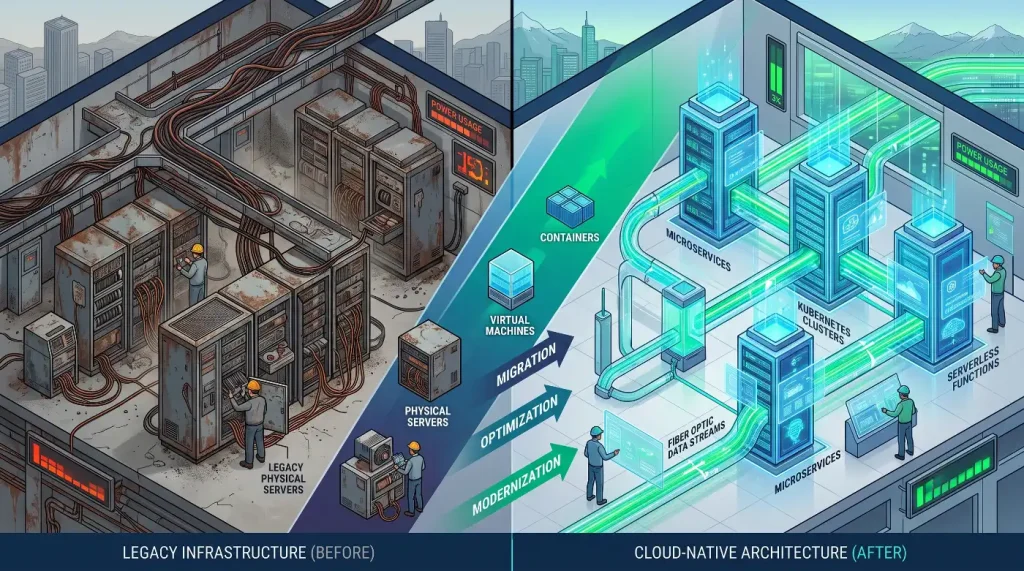
Enterprise leaders face an urgent challenge when updating core business applications. Legacy systems often run critical, revenue-generating operations. These aging platforms become expensive to maintain over time. They lack the flexibility needed to support modern web and mobile features. Deciding to update these core technologies introduces significant operational risk. A minor oversight during data migration can halt production services. Unexpected software bugs can disrupt user transactions and damage brand reputation. Engineering teams must validate application behavior at every phase of a digital overhaul. Adopting a modern testing strategy eliminates migration surprises. This guide covers how continuous validation ensures a safe path to modernized enterprise platforms. The True Risks of Technical Debt and System Decay Legacy software applications gradually turn into highly complex structures. Decades of quick patches and custom updates build deep layers of technical debt. Documentation often becomes outdated or disappears entirely when original developers leave the company. This lack of clear visibility creates major friction during a digital transformation. Engineering teams struggle to identify all active dependencies within the application. Changing a single database column can trigger unexpected failures across unrelated business workflows. Failing to test early leads to severe production issues during rollout. Enterprise systems risk massive financial losses when core processing engines go offline. Furthermore, manual validation methods cannot keep pace with modern cloud architectures. Relying on slow, human-driven regression cycles stalls the entire modernization effort. Choosing Your Modernization Architecture Blueprint Organizations typically select one of three main architecture blueprints to update their legacy foundations. Each strategy demands a distinct approach to quality assurance and system validation. The Replatforming Approach Replatforming shifts the existing core application to modern cloud infrastructure with minimal code alterations. Engineers adjust specific configuration layers to leverage cloud-native database services and automated scaling groups. The core business logic remains largely untouched during this move. Testing teams focus heavily on environmental configuration checks and baseline infrastructure performance. The Refactoring Approach Refactoring involves breaking down a large, monolithic application into decoupled microservices. Developers rewrite old code structures using modern programming languages and cloud frameworks. This model introduces new API communication channels that require rigorous structural validation. Test suites must verify that individual microservices exchange information accurately without losing transaction data. The Replacement Approach Replacement completely retires the legacy platform in favor of a third-party software solution. Teams migrate complex on-premise business data into modern cloud platforms. The QA strategy centers almost exclusively on end-to-end integration and data fidelity checks. Testers must ensure the new platform maps all historical enterprise transactions accurately. For an in-depth look at managing data mapping standards during complex migrations, review the W3C data integration frameworks. Building a Strategy for Continuous Legacy Validation Mitigating modernization risk requires embedding automated validation checks into every step of the transition pipeline. This continuous framework tracks software behavior from development through production rollout. The deployment validation pipeline establishes a rigorous sequence to protect data integrity. Software updates begin in local developer sandboxes before moving to central integration platforms. The build then advances through automated staging and pre-production sandboxes to verify data migration mapping. Finally, the thoroughly validated code deploys safely into the live enterprise environment. Discovering System Dependencies The validation process starts by mapping existing application workflows. Engineering teams use automated tracing tools to log live system traffic. This data identifies hidden database connections and undocumented third-party API dependencies. Understanding these connection points prevents teams from breaking critical pathways during the overhaul. Creating a Baseline Regression Suite Teams must establish a dependable performance baseline using the stable legacy application. Automated test suites record exactly how the old system processes transactions and handles user inputs. This comprehensive baseline acts as a truth metric for the modernization project. The engineering team runs these exact tests against the new cloud application. Any variance in output alerts developers to logic flaws before the platform goes live. Executing Shadow Testing Loops Shadow testing runs the new cloud application parallel to the active legacy platform. Production traffic routes to both environments simultaneously. The legacy system continues to serve live users while the new platform processes the same data in a silent environment. Monitoring tools compare the processing outputs of both systems in real time. This mechanism highlights hidden errors under true enterprise workloads without impacting active customers. To learn more about modern system reliability and cloud verification standards, consult the IEEE software engineering guidelines. Solving Script Upkeep with Keyword Testing Enterprise modernization initiatives frequently stall due to the sheer volume of test maintenance. When developers rewrite old code structures, user interfaces and backend APIs shift constantly. Traditional test automation scripts break repeatedly during these rapid adjustments. Engineering teams waste valuable hours fixing fragile scripts rather than executing comprehensive testing cycles. A patented framework resolves this issue by separating test logic from the underlying code. The Keyword Automation Testing approach allows teams to build resilient test suites that handle fast-paced application updates. The operational workflow establishes a clean division of labor across the engineering department. Business analysts and domain experts design comprehensive test paths using natural language Keywords. They arrange functional blocks like “Process Invoice” or “Verify Customer Balance” without writing script files. This design layer feeds directly down to automation engineers, who write the reusable code for each Keyword exactly once. When a database structure or interface changes during modernization, engineers modify only the affected Keyword. The underlying code change updates the entire test asset library instantly. Teams no longer need to manually modify thousands of individual regression tests. This decoupling slashes maintenance costs and keeps the validation pipeline running smoothly. Managing Test Data Across Legacy and Cloud Environments Data management presents a major hurdle during a digital overhaul. Legacy databases often store records in outdated, proprietary formats. Modern cloud applications require clean, structured data models. Running automated tests with unmapped or corrupted data yields false positives. These inaccurate results degrade team confidence in the automated pipeline. Organizations must prioritize automated test data provisioning. Delivery pipelines should automatically extract, mask, and format data sets for every test cycle. Masking confidential
Migrating from Legacy Automation to Keyword Frameworks

Enterprise software development teams frequently hit a wall with traditional test automation. Early on, writing custom scripts for every new feature seems efficient. Developers and testers build out massive libraries using code-heavy test scripts. Over time, this approach creates major bottlenecks. Application updates break fragile locators, requiring hours of manual script repairs. The testing team spends more time debugging the test automation suite than validating actual business logic. Swapping a brittle, code-dependent testing setup for a maintainable structure requires an intentional shift. Migrating to an advanced Keyword Framework protects previous software investments while removing script upkeep. This guide explores the path to transforming legacy test scripts into a scalable, Keyword-Driven automation engine. The Core Bottlenecks of Brittle Legacy Test Automation Legacy automation scripts typically rely on hardcoded paths and linear execution flows. When engineers build tests this way, the test logic binds directly to the application interface elements. A simple modification to a web form or a changed API response field causes multiple scripts to fail simultaneously. This coupling triggers a problematic cycle of maintenance. Testing engineers must search through thousands of lines of test code to update broken object paths. As a result, the release pipeline slows down while teams wait for test script remediation. Furthermore, code-heavy automation setups alienate non-technical stakeholders. Business analysts and manual testers cannot easily read or write complex script files. This separation forces a small group of automation engineers to handle all test maintenance. The automation suite falls behind the development pace, and teams default back to manual validation to hit deadlines. Breaking Down the Core Mechanics of Keyword Frameworks A Keyword-Driven framework removes script maintenance by separating the functional test definition from the underlying code execution. Instead of reading lines of programmatic script, a test case appears as a logical sequence of human-readable actions. The structural framework splits test asset design into two independent layers. The presentation layer uses plain business actions like “Input Username,” “Select Shipping Method,” or “Authorize Payment.” Non-technical team members combine these Keywords to build end-to-end testing scenarios. The implementation layer lives entirely beneath the surface. Automation engineers write the actual code required to execute each Keyword just once. This code links directly to application objects, database tables, and API interfaces. When a developer changes an application element, the engineering team modifies only the code inside that single Keyword. Every test case using that action updates automatically across the entire enterprise. Designing Your Phased Test Automation Migration Strategy Abandoning a legacy testing suite all at once creates unnecessary operational risk. A structured, phased migration plan ensures ongoing test coverage while you transition to a Keyword setup. The step-by-step transition moves systematically through four distinct operations to preserve pipeline stability. The journey begins with a complete component audit to catalog and clean up the existing script repository. Once organized, the workflow advances to core Keyword mapping, where engineers translate repetitive code blocks into shared functional actions. Teams then deploy these definitions into a parallel execution loop to run the old and new frameworks side-by-side. After proving data consistency and accuracy, the pipeline concludes with a full cutover to the standalone Keyword platform. Phase 1: Auditing the Existing Test Asset Inventory The migration process begins with a comprehensive audit of all active legacy test scripts. Teams must analyze the current test catalog to identify duplicate scenarios and redundant validation paths. Group scripts by business domain, such as user onboarding, checkout flows, or report generation. This step highlights the application areas causing the highest script maintenance overhead. Phase 2: Mapping Commonalities to Build the Keyword Dictionary Next, look for repetitive programming logic inside the legacy scripts. Actions like logging into an application or filling out address forms appear in hundreds of test cases. Extract these repeating blocks to form your initial Keyword dictionary. Keep Keyword definitions broad enough to accept different data inputs. For example, a single “Enter Text” Keyword should handle usernames, search terms, and email fields by changing its input variables. Phase 3: Running Parallel Validation Loops Never delete legacy automated scripts before confirming the accuracy of the new Keyword Framework. Run both test suites in parallel against identical software builds. Compare test execution speeds, pass rates, and defect detection capabilities between the two platforms. This side-by-side run builds organizational trust in the Keyword framework before you phase out the old tools. For deeper insights on managing data verification standards during large systems migrations, consult the W3C data activity principles. Resolving Script Upkeep via Patented Keyword Testing Many teams try to build their own Keyword layers on top of open-source automation libraries. These internal projects frequently fail because the custom framework code itself becomes hard to maintain over time. The team ends up building a second software product just to test their main application. Using a proven platform avoids this internal development trap. A pre-built Keyword Automation Testing system delivers a stable architecture from day one. This specialized engine handles script maintenance automatically so your team can focus on product quality. Organizations evaluating their transformation paths frequently notice two distinct outcomes. A traditional migration approach routes legacy scripts directly into custom-built framework code, which quickly leads to a secondary bottleneck of high internal framework maintenance. In contrast, the optimized path channels legacy asset analysis through a pre-built patented engine, delivering zero tool lock-in alongside low long-term upkeep. This model changes how engineering resources are distributed. Instead of spending seventy percent of their time updating broken test paths, engineers dedicate their day to expanding test coverage. Non-technical business experts take over test creation using the plain-language Keywords. The testing engine maps these natural phrases directly to application elements, creating a scalable validation loop that keeps pace with rapid code releases. Managing and Provisioning Test Data in Keyword Pipelines Migrating to a Keyword framework requires updating how your team manages test data. Legacy testing setups often hardcode user profiles, product SKU numbers, and credit card values directly into script files. This practice causes test failures when data sets expire or change
QA in Government and Defense Software Projects

Government and defense software projects operate under unique pressures. These mission-critical systems handle national security, public infrastructure, and sensitive civilian data. A minor software flaw in a commercial app might cause user annoyance. A software flaw in a defense network can compromise critical infrastructure or put human lives at risk. Engineering teams in this space must deal with strict regulatory compliance alongside rapid technical change. Historically, these strict demands led to long, rigid development cycles. Federal agencies relied heavily on slow, manual quality assurance checks before releasing updates. Modern public sector organizations must balance safety with delivery speed. Achieving this balance requires a transformation in how teams validate software. Implementing an advanced automated quality assurance framework protects public trust and secures critical digital operations. Strict Standards in Public Sector Software Engineering Federal software delivery operates under some of the most demanding regulatory frameworks in the world. Defense applications must comply with strict criteria designed to protect infrastructure networks. Software engineers must follow explicit guidelines for information assurance and cybersecurity configurations. These rules govern encryption protocols, identity management, and vulnerability remediation across all environments. Civilians systems also face comprehensive accessibility and data integrity laws. Systems must undergo regular checks to ensure all citizens can access public digital services equally. At the same time, platforms handling sensitive personal information require strict data privacy controls. Navigating these overlapping layers of compliance leaves little room for error during development. The Failure of Legacy Manual Verification in Federal IT Traditional government IT projects often run into major bottlenecks during the verification phase. Relying on human testers to manually step through massive compliance checklists results in exceptionally long deployment cycles. These human-driven checks slow down feedback loops and make it difficult for development teams to address code issues early. Manual testing methods struggle to validate modern microservices and cloud-native systems. A manual tester cannot easily trace data changes across distributed cloud environments or simulate thousands of simultaneous network actions. This limitation often leads to critical bugs slipping through undetected into production environments. Furthermore, manual compliance audits create substantial administrative overhead. Engineering teams spend weeks gathering data and writing testing reports for regulatory inspectors. This reactive approach diverts valuable resources away from building new public features and fixing core application logic. Architectural Models for Modern Government Architecture Federal agencies typically use three core architectural models to modernize their legacy software systems. Each framework requires a specialized validation strategy to ensure compliance and system stability. Secure Cloud-Native Environments Cloud-native models migrate old on-premise systems into managed federal cloud platforms. Engineers modify application configurations to leverage secure, automated scaling groups and isolated database architectures. Testing teams operating in cloud environments focus heavily on infrastructure configurations, identity verification pathways, and network performance baselines. Decoupled Microservice Networks Microservice architectures break down large legacy monoliths into smaller, independent service components. Developers rewrite older application layers using modern languages and secure communication channels. This model introduces complex API messaging pathways that require deep automated testing. Test suites must confirm that individual microservices exchange classified data accurately without exposing endpoints to security vulnerabilities. Hybrid Cross-Agency Systems Hybrid networks link older on-premise mainframe hardware with modern web and mobile frontends. These setups handle massive citizen data transfers across disparate federal networks. The validation strategy centers tightly on end-to-end data integrity, messaging latency, and secure format mapping. Testers ensure that sensitive data transfers remain intact across every infrastructure hop. For complete technical details on managing web data structures and integration protocols, review the W3C data activity frameworks. Designing a Modern Pipeline for Public Sector Software Achieving high release speeds without compromising national security requires embedding automated validation loops into every layer of the delivery pipeline. This structure tracks compliance from the first line of code down to production operations. The federal software pipeline moves through a strict progression of environments to ensure security compliance. Code transformations start in isolated developer workstations before moving into central automated compilation pipelines. The build then moves through dedicated pre-production staging networks to verify security compliance before finally deploying to live public infrastructure. Mapping Compliance Standards Early The validation process starts by analyzing regulatory criteria before writing new features. Engineering teams use automated translation systems to turn legal compliance checklists into distinct test conditions. This early mapping prevents developers from accidentally building configurations that violate security protocols. It aligns development teams around security compliance goals from day one. Establishing Security Performance Baselines Teams must create historical performance baselines using existing stable platforms. Automated test suites record exactly how systems process data, handle memory usage, and respond to network transactions under stress. This baseline serves as a validation benchmark for future software updates. Engineers run these identical tests against modified code builds to detect any unauthorized changes in system behavior before deployment. Running Continuous Vulnerability Checks Continuous validation systems run automated vulnerability analyses alongside functional tests. The pipeline evaluates third-party code libraries for known security flaws during compilation. It checks infrastructure configuration scripts for misconfigured access privileges or open ports. This proactive testing catches security vulnerabilities early, preventing high-risk code from advancing toward production networks. For deep research on modern systems engineering and software assurance practices, consult the IEEE computer society standards. Solving Script Upkeep via Patented Keyword Testing Government software projects frequently stall due to the massive burden of test automation upkeep. In long-term defense programs, user interfaces and data schemas change constantly as new security patches roll out. Traditional code-heavy test scripts break repeatedly during these rapid adjustments, forcing engineers to spend their time debugging test code rather than validating actual system workflows. A patented framework resolves this issue by separating functional test design from underlying code implementation. The Keyword Automation Testing approach allows public sector teams to build resilient test libraries that adapt easily to ongoing system updates. The operational workflow splits testing responsibilities cleanly across the engineering department. Domain experts and compliance analysts design comprehensive test workflows using plain business actions. They assemble validation paths using intuitive terms like “Verify Security Token,” “Encrypt Record,” or “Submit Claim”
Testing Property Management Software for Accuracy

Real-estate technology platforms handle immense operational responsibilities. Modern property management software processes millions of dollars in rental transactions. These platforms track intricate lease configurations, schedule building maintenance, and store confidential tenant background checks. A minor data processing error in a standard commercial application can be annoying. A processing error in real-estate tech can lead to severe regulatory fines, lost rent, or wrongful eviction actions. Engineering teams in this space must balance rapid feature updates with absolute mathematical precision. Relying on outdated validation methods introduces unacceptable business risks. Implementing a comprehensive, automated quality assurance strategy ensures software accuracy and protects property assets. High Stakes and Strict Compliance in PropTech Architecture PropTech software engineering functions under complex regulatory frameworks and financial constraints. Platforms must accurately calculate changing rental rates, late fee percentages, and prorated tenant security deposits. Minor rounding mistakes across large property portfolios can quickly balloon into major financial discrepancies. Beyond financial arithmetic, real-estate platforms must comply with strict housing laws and accessibility standards. For instance, tenant filtering algorithms must follow fair housing guidelines to avoid discriminatory screening patterns. At the same time, platforms holding private resident credit ratings require ironclad security controls. Navigating these overlapping operational mandates leaves zero room for error during development. The Downside of Slow Manual Validation in Real Estate Tech Traditional property management software projects often encounter massive bottlenecks during the verification phase. Relying on human testers to manually click through complex leasing options creates long release cycles. These human-driven checks slow down engineering feedback and make it difficult for teams to address code bugs early. Manual testing techniques struggle to validate distributed cloud setups and integrated payment processing systems. A manual tester cannot easily trace transactional data variations across multiple international bank gateways. They also cannot simulate thousands of simultaneous tenant portal logins during peak rent collection windows. This testing limitation causes critical logic bugs to pass undetected into live production networks. Furthermore, manual compliance audits demand heavy administrative efforts. Engineering teams spend days gathering testing evidence for regulatory compliance reviews, which shifts focus away from building new software features. Architectural Models for Modern Property Platforms Real-estate technology providers typically utilize three primary architectural models to host and scale their management platforms. Each structure demands a specialized testing strategy to ensure data precision and uninterrupted operation. Unified Cloud Management Systems Unified cloud setups host all property data, tenant portals, and leasing ledgers on integrated cloud infrastructure. Engineers configure application clusters to manage automated load balancing and secure data isolation across different real-estate portfolios. Testing teams focusing on unified cloud setups analyze server capacity metrics, identity token validation, and baseline baseline query performance. Decoupled Core Microservices Microservice architectures break down large property platforms into smaller, specialized services. Individual components handle distinct tasks like processing credit cards, generating lease documents, or filing maintenance requests. This model introduces web API messaging channels that require rigorous validation. Test suites must confirm that individual microservices transfer sensitive financial data reliably without introducing data errors or security gaps. Integrated Third-Party Property Networks Integrated networks link core property management engines with external software platforms like smart lock systems, background check agencies, and localized tax databases. These ecosystems process continuous data flows across disparate corporate servers. The testing strategy focuses heavily on complete end-to-end data integrity, communication latency, and webhooks mapping. Testers make sure that data structures match formatting rules across every external connection. To discover more about global internet data structure standards and integration protocols, review the W3C data activity principles. Designing a Modern Pipeline for PropTech Validation Maintaining fast deployment cycles while ensuring complete financial accuracy requires embedding automated validation routines into every step of the delivery pipeline. This continuous strategy tracks software performance from initial development to live production deployment. The property software release pipeline uses a strict progression across isolated environments to guard transaction security. Updates begin in local development sandboxes before merging into automated integration servers. The software build then moves through staging and pre-production networks to run automated financial stress tests before finally deploying to active property portals. Defining Calculation Rules Early The verification process begins by detailing calculation rules before writing feature code. Engineering teams translate complex leasing logic and tax guidelines into explicit automated test conditions. This early work prevents developers from building mathematical formulas that break accounting practices. It aligns the entire development squad around software accuracy targets from day one. Establishing Financial Performance Baselines Teams must create historical performance baselines using existing stable software platforms. Automated test suites record exactly how systems process rent ledgers, calculate interest, and manage large reporting workflows under load. This data serves as a dependable benchmark for evaluating subsequent software updates. Engineers execute these exact test suites against modified builds to catch unexpected calculation variations before deployment. Running Continuous Security and Privacy Audits Continuous testing routines run automated security validation alongside functional software checks. The delivery pipeline screens third-party code packages for known vulnerabilities during the compilation process. It checks cloud infrastructure definitions for weak encryption setups or excessive database access privileges. This proactive approach identifies compliance risks early, preventing unstable code from advancing toward active tenant-facing portals. For comprehensive insights into software engineering quality standards and system reliability models, consult the IEEE computer society guidelines. Solving Script Upkeep via Patented Keyword Testing PropTech development projects often stall due to the massive burden of test automation maintenance. In modern property platforms, user interfaces and transaction forms change constantly to match new design trends or localization requirements. Traditional code-heavy test automation scripts break repeatedly during these quick interface updates. This forces engineers to spend their days repairing broken test code rather than checking core software logic. A patented testing framework eliminates this issue by decoupling functional test design from underlying code execution. The Keyword Automation Testing approach allows real-estate software teams to build stable test suites that adapt instantly to system modifications. The operational workflow splits testing responsibilities across different team members. Property domain experts and business analysts design comprehensive testing scenarios using clear, natural terms. They assemble
Scriptless vs. Keyword-Driven Testing for Enterprises
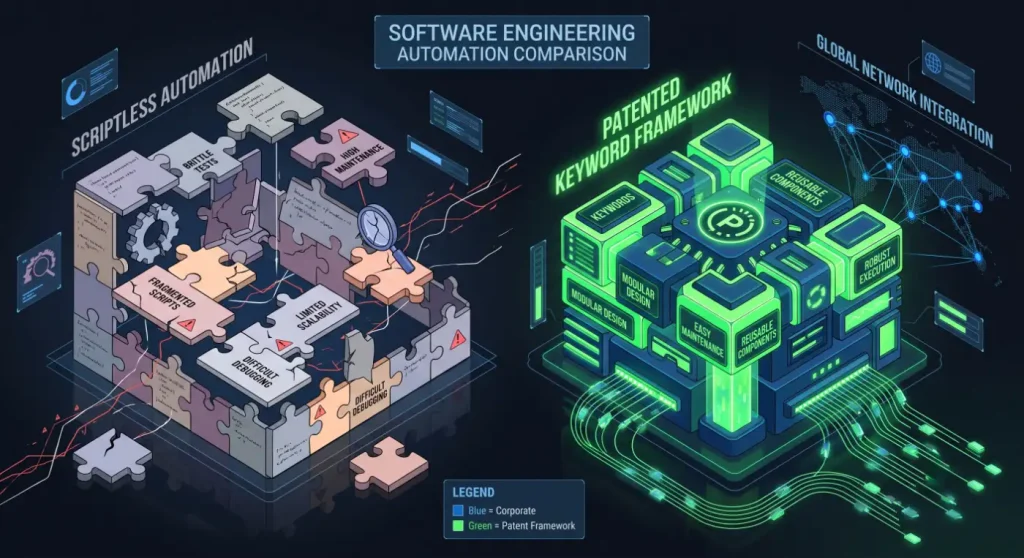
Enterprise software engineering departments operate under a constant directive to accelerate release velocity. Business demands require continuous delivery pipelines to ship updates multiple times per day. Quality assurance teams must scale their testing coverage proportionally to protect production applications from catastrophic regressions. To keep pace, many modern organizations seek alternatives to traditional, code-heavy test automation. Writing custom scripting files for every single validation scenario creates immense technical debt over time. Two prominent alternatives have emerged to address this operational bottleneck: scriptless test automation and Keyword-Driven testing frameworks. While both methodologies aim to lower the bar for non-technical test creation, they rely on entirely different structural architectures. Selecting the incorrect model can trap an enterprise in restrictive software ecosystems or escalate long-term maintenance costs. Evaluating these options reveals the ideal mechanism for scaling enterprise-grade automated regression libraries. The Operational Mechanics of Scriptless Test Automation Scriptless test automation tools leverage visual, low-code, or no-code interfaces to facilitate test asset generation. Instead of writing text-based programming files, users create validation steps through visual mechanics like drag-and-drop workflow builders. Most scriptless testing platforms incorporate a background recording engine. A tester navigates through the target web or mobile application while the tool records mouse clicks, keystrokes, and page navigations. The underlying system automatically converts these captured frontend interactions into background execution commands. These visual interfaces accelerate initial test case creation during early product iterations. Non-technical stakeholders, business analysts, and domain experts can rapidly document user journeys. This capability bypasses the need for immediate technical development and enables early validation coverage. Core Technical Bottlenecks of Scriptless Systems Despite the immediate speed of low-code creation, scriptless platforms frequently struggle when deployed across complex enterprise environments. The core limitation stems from how these tools capture and maintain application locators. Fragile UI Dependencies Because scriptless platforms focus heavily on recording frontend user interactions, the generated tests become highly dependent on the surface user interface. Minor updates to HTML element structures, button IDs, or CSS layouts can instantly invalidate dozens of recorded visual steps. When a development squad modifies a main application workflow, the testing team must often record the visual journey again from scratch. This fragile relationship introduces a problematic cycle of script maintenance that directly stalls continuous integration pipelines. Limited Backend and API Validation Support Modern enterprise platforms rely on intricate microservice layers, asynchronous data queues, and legacy mainframes. Scriptless testing tools are generally designed to look at frontend web pages and mobile views. They typically lack native capabilities for validating raw API payloads, executing complex database queries, or testing system-to-system messaging contracts. This structural blind spot forces organizations to maintain separate technical test frameworks to validate backend services. Vendor System Lock-In Many scriptless automation tools operate on closed, proprietary software platforms. The recorded tests are stored in custom file formats that can only execute within that specific vendor’s system runner. Consequently, organizations lose the ability to customize execution engines or integrate natively with open-source developer toolsets. If the vendor raises licensing fees or falls behind market technological changes, migrating those proprietary assets becomes a costly engineering project. Explaining the Keyword-Driven Testing Architecture A Keyword-driven framework uses a different approach by entirely decoupling the functional design of a test case from its technical execution code. Rather than recording surface actions, the framework organizes application behaviors into distinct, reusable operational blocks known as Keywords. The presentation layer displays Keywords using plain, human-readable business terms like “Submit Loan Application,” “Verify Profile Balance,” or “Authorize Electronic Payment.” Test creators assemble these standardized blocks sequentially to build comprehensive, end-to-end regression validation paths. The implementation layer functions completely beneath the surface of the plain-language Keywords. Automation engineers develop the underlying technical code required to execute each Keyword exactly once. This hidden code maps directly to specific page objects, application interface elements, backend databases, and external API service components. Why Patented Keyword Frameworks Outperform Scriptless Alternatives When evaluated at true enterprise scale, Keyword-driven architectures resolve the core maintenance and scalability limitations that hinder scriptless platforms. Choosing a proven platform avoids the common traps associated with low-code testing tools. The structural advantages of a mature framework are realized through the SDT advantage, which delivers a roles-based model built explicitly for long-term scalability. This specialized engine removes execution friction while ensuring the entire testing matrix remains highly maintainable as software systems evolve. Slashing Maintenance via Modular Decoupling When an application element or database layout shifts during an enterprise software update, a Keyword-driven framework isolates the modification. Automation engineers update the underlying code inside the single affected Keyword. The adjustment propagates automatically across every test case using that action across the organization. This structural containment eliminates the need to rewrite or re-record hundreds of distinct test cases, dropping maintenance upkeep requirements significantly. Unified Full-Stack System Validation Unlike frontend-restricted scriptless platforms, a robust Keyword framework can validate the full enterprise technology stack. The same plain-language Keyword model scales seamlessly to test desktop interfaces, legacy mainframes, responsive web designs, mobile applications, and complex backend microservices. A single end-to-end Keyword test suite can verify a frontend web transaction, confirm the resulting microservice API event, and validate the final record update inside a backend relational database. Organizations can review how these unified verification processes operate at scale by reading these published enterprise case studies. Eliminating Lock-In via Open Tool Compatibility Advanced Keyword Solutions reject restrictive, closed software setups. The patented system architecture maintains full compatibility with industry-standard, open-source testing libraries like Selenium, Robot Framework, and JMeter. This preservation protects your previous framework code and employee skillsets. Your enterprise retains complete ownership over the generated test asset library, meaning your quality infrastructure can adapt when new developer frameworks arrive. Aligning Team Roles via Roles-Based Automation A Keyword Framework establishes a clear division of engineering labor that maximizes team productivity. Scriptless testing often creates a blurry operational line where non-technical testers encounter hidden technical bugs inside proprietary low-code blocks. The Keyword-driven model establishes an optimized relationship based on a clear hierarchy of roles. At the foundation, a small core team of technical
Keywords Simplify Cross-Platform Testing Complexity
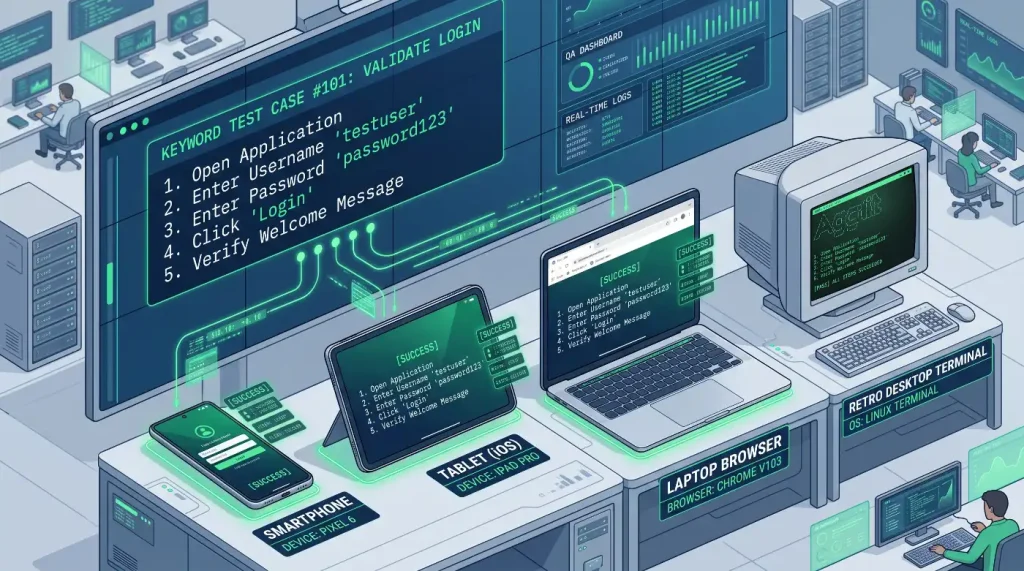
Modern enterprises must deliver flawless user experiences across an ever-expanding matrix of environments. Customers demand that business services perform identically on desktop web browsers, native mobile operating systems, and legacy terminal windows. Engineering teams face massive operational friction trying to validate application behavior across these diverse channels. Building unique automated validation scripts for every distinct software platform drains valuable engineering resources. The traditional script-heavy approach introduces severe delivery bottlenecks. Transitioning toward a centralized, plain-language methodology resolves these issues completely. Implementing an advanced Keyword framework allows teams to manage multi-platform quality assurance from a single, maintainable library. The Compounding Overhead of Multi-Platform Operations Modern enterprise architectures rarely live on a single technology layer. A typical omni-channel customer workflow might originate on a mobile app, require backend administrative processing on a desktop app, and finalize data on a mainframe legacy database. Validating this complete customer journey introduces extreme technical challenges. Traditional quality assurance infrastructure relies on siloed automation frameworks to interact with different operating tiers. Engineers must learn separate development languages and object identification protocols for each targeted software environment. This fracturing forces QA departments to maintain distinct, disconnected test automation repositories. When business rules change, teams face a massive script maintenance problem. Engineers must manually search through multiple test suites to update broken locator codes or step logic. The resulting technical debt stalls delivery velocities and strains collaboration between development teams and business analysts. Architectural Challenges of Cross-Platform Automation Engineering teams encounter structural friction across three main application environments. Each operating tier requires entirely different validation mechanics, making unified testing difficult. Fragmented Responsive Web Platforms Web applications must scale dynamically across an endless matrix of browsers and screen sizes. Front-end developers utilize modern JavaScript frameworks to build highly interactive user interfaces. These dynamic layouts cause major instability for traditional automation scripts. Hardcoded page element paths break frequently when code changes shift visual positions or update hidden document structures. Varied Native Mobile Environments Mobile validation requires handling different device configurations, touch gesture mechanics, and hardware limitations. Automated scripts must interact reliably with native device buttons, internal file directories, and external notifications. Managing these distinct operational loops across both main mobile operating systems typically demands specialized engineering skills. The separation slows down feature releases and splits testing coverage. Complex Desktop and Enterprise Services Many major corporations continue to manage core operations using custom desktop clients and older legacy mainframes. These back-office systems do not utilize standard web tags or mobile screen coordinates. Interacting with these applications requires specialized desktop automation drivers. This technical division makes it extremely difficult to create a unified end-to-end testing run that spans across both web and legacy infrastructure. To learn more about modern global definitions for cross-platform software performance, consult the W3C web application standards. The Hidden Failure of Code-Heavy Test Automation Suites Many technology organizations try to resolve cross-platform testing problems by hiring more software automation engineers to write custom code. Teams build out extensive, programmatic test libraries using raw open-source automation drivers. While this method can deliver initial test validation successes, the long-term total cost of ownership rises quickly. As the underlying application features grow, the visual elements and backend API contracts shift continuously. Custom code scripts are highly sensitive to these small variations. A single database column update or structural change on a web form can cause hundreds of individual test scripts to fail simultaneously. The engineering squad gets trapped in a reactive cycle of script maintenance. Testing professionals spend seventy percent of their working hours debugging broken test paths rather than testing new features. Furthermore, code-heavy automation files completely alienate non-technical stakeholders like business analysts and product managers. These experts cannot read or write complex software scripts. This creates a reliance on a small technical team, creating major delivery bottlenecks across the enterprise. Explaining the Mechanics of Plain-Language Keyword Frameworks A Keyword-driven automation architecture solves cross-platform friction by completely separating the functional test definition from the technical implementation code. Instead of displaying lines of programming code, a test case appears as a logical sequence of human-readable, reusable actions. The operational pipeline breaks down test building into two separate working tiers. The presentation layer displays high-level Keywords using clear business actions like “Open Customer Profile,” “Process Credit Card,” or “Verify Shipping Invoice.” Business analysts and manual testing staff arrange these standardized modules sequentially to build comprehensive testing paths. The implementation layer functions entirely beneath the surface of the plain-language Keywords. Technical automation engineers write the underlying execution code for each Keyword just once. This hidden code maps the Keyword directly to specific application elements, database entries, or API endpoints. How Keywords Standardize Multiple Software Platforms The primary benefit of an Advanced Keyword Architecture is its ability to use the same business actions across completely different technical environments. The framework hides platform-specific driver code underneath a unified user experience. The core execution path is driven by a single business Keyword, such as Entering a Password, which sits at the top of the workflow layer. This unified Keyword acts as a single point of configuration that coordinates multiple underlying driver channels concurrently. The framework dynamically splits the single instruction into distinct technical pathways, routing the request to a web browser driver to locate a specific HTML input, a mobile screen driver to pinpoint a native app field, and a desktop client driver to interact with a specific window element. Consider a standard enterprise transaction that requires entering a security password across a web portal, a mobile app, and a desktop terminal. In a traditional scripting model, engineers must write three distinct code scripts using different locator definitions. With a unified Keyword Architecture, the test designer uses a single phrase like “Enter Password” across all environments. The central framework dynamically routes that single phrase to the correct underlying technical driver based on the active test platform. If a backend developer modifies a database tag or a front-end class identifier, the change remains contained. Engineers update the locator inside that single Keyword definition, and the entire multi-platform testing